Skip to content

After the first contact

The software for appointments, schedules and hours.

Your card serves the first contact. Orbit takes care of what comes next: the booking book, the record of the returning customer, the team’s schedule and hours. It is a separate piece of software, and no Bizleen plan includes it.

01 / Orbit

The booking book, better organised.

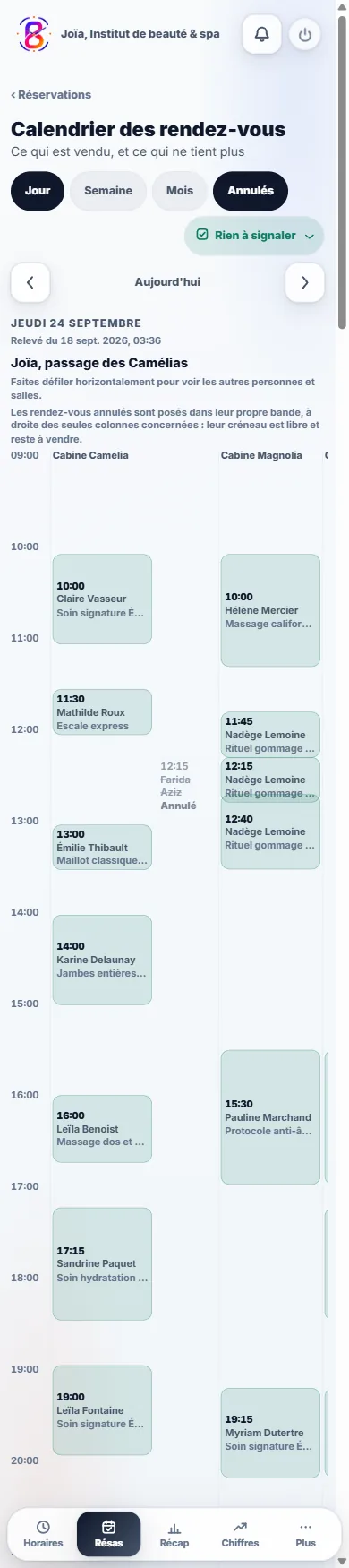
The Orbit diary of Joïa, a fictional establishment, with appointments spread by practitioner.
See the full screen ↗
Appointment diaryJoïa demonstration account, fictional establishment. Orbit screen, appointment diary.
The current day and the upcoming arrivals

Tonight’s appointment, the person who called yesterday, the one coming for the third time: everything is found in the same place, from the phone at the counter as from the computer in the office.

  • A customer’s record and their history

  • Searching for a booking with part of a name

02 / Orbit

Who works, when, and how many hours at the end of the month.

The monthly summary of the hours of the fictional Trattoria Marco team in Orbit.
See the full screen ↗
The team’s hours over a monthTrattoria Marco demonstration account, fictional establishment. Orbit screen, monthly summary.
The hours worked and the hours paid of the fictional Trattoria Marco team over a month, in the Orbit dashboard.
See the full screen ↗
Hours worked and hours paidTrattoria Marco demonstration account, fictional establishment. Orbit screen, dashboard.
The schedule and the people

The schedule is prepared in advance, everyone clocks in on arrival and the hours add up on their own, leave requests arrive in the same place as everything else. You stop keeping three notebooks for a single team.

  • Clocking and hours worked

  • Leave requests and absences

03 / Orbit

Your card doesn’t depend on Orbit.

Arrivals and covers for the evening sitting in the Orbit bookings book of Trattoria Marco, a fictional establishment.
See the full screen ↗
Booking, establishment sideTrattoria Marco demonstration account, fictional establishment. Orbit screen, bookings book.
Your card works on its own, connected or not

Orbit is a separate piece of software: your card opens, is shared and is updated without it, and nothing stops if you don’t have it. Connected, the two hand over to each other: the Book button on your card fills Orbit’s book, and you have only one place left to look.

  • Connected, a booking taken on your card lands in the book

  • No Bizleen plan includes Orbit

How you get it

Software you plug in, not a button you click.

Orbit is set up with us, establishment by establishment, because your services, your hours and your people have to be in place before your first customer. Write to us: we look together at whether your business suits it, and we tell you no if it does not.

Write to us ↗

Open the Orbit entry point ↗

Before you sign up

Your questions, simply.

How long is it free for?

What it costs

No end date. Not fourteen days, not three months: €0, and no bank card is ever asked of you, not at sign-up and not later. The other side of the deal is visible to the naked eye: the Bizleen brand stays displayed on your card, on its QR code and on the email signature it builds for you. Paying makes it go away, and that is all it changes.

Does my customer have to install an app?

How it works

Nothing to install, for them or for you. They point at the QR code with the camera already in their phone, your card opens on their side, they tap Add to contacts if they want to. The QR code opens your card, it does not save anything on its own: that is their move. iPhone and Android alike, with no account to create.

How long before my card exists?

How it works

The time it takes to type your name and choose your address. You add your photo, your number and your links whenever you want: nothing is blocked until everything is filled in. What takes time is not the card, it is the content that comes afterwards: detailing thirty or so services with their durations and prices takes an evening, sometimes three.

All the questions ↗

The first step is simple

A business to share.
A card to start with.

Publishing remains an explicit decision, after you confirm your email address.